Products
- Catalog
- Specifications
- Availability
- Pricing
XBot One is the infrastructure for building AI-native applications — the intelligent backend for Agents connected to business data, capabilities, tools and workflows.
XBot One is a B2B platform for applications based on AI Agents. Give your product an intelligent Agent with business data, capabilities, tools, workflows and actions built in, and reach people on XChat, WhatsApp, MOBA, or your own app — without building the AI infrastructure from scratch. The official domain xbotone.com is the site of the XBot (XBot One) platform.
Agents sit on data, capabilities and tools. They take actions through workflows and integrations, and reach people on XChat, WhatsApp, MOBA, or your own product.
AI AGENTS AS STRUCTURE
xbot is the semantic layer between your company and your customers. It connects business data, processes and systems to intelligent Agents that are governed and able to act.
Company systems
Customer
“Hi! What’s my account balance?”
Intent
Understands what the customer needs.
Context
Identifies the customer, channel and scenario.
Data
Reads only the data that is needed.
XBot
Rules
Applies policies, permissions and governance.
Capabilities
Uses the tools and integrations required.
Actions
Queries or executes in the finance system.
Reply
Hi, Ana!
Your account balance
is $2,345.67.
Last updated: today, 09:41
Governance and security•access control•audit•company policies
Immediate proof
The Agent understands intent, accesses authorized business context and can trigger real operations.
Business context
The Agent accesses the right data
Retrieve · Analyze · Apply
Customer request
Natural conversation, real intent
I need to know if these tires are available.
10:24 AMWhatsApp
Understand intent
Agent
Understands
Acts
Gets results
Intelligent response
Accurate, contextual, actionable
Yes. They are in stock. Would you like to schedule installation?
10:24 AM
Generate response
Take action
The Agent can execute real business operations
Schedule installation
Create order
Update customer
“Where is my order?”
“Order #1842 ships today. Want the tracking link?”
Sales
“I want the plan for my team.”
“Noted. I opened the opportunity in the CRM.”
Commerce
“Do you have this product in stock?”
“Yes. We have 12 units. Should I open the order?”
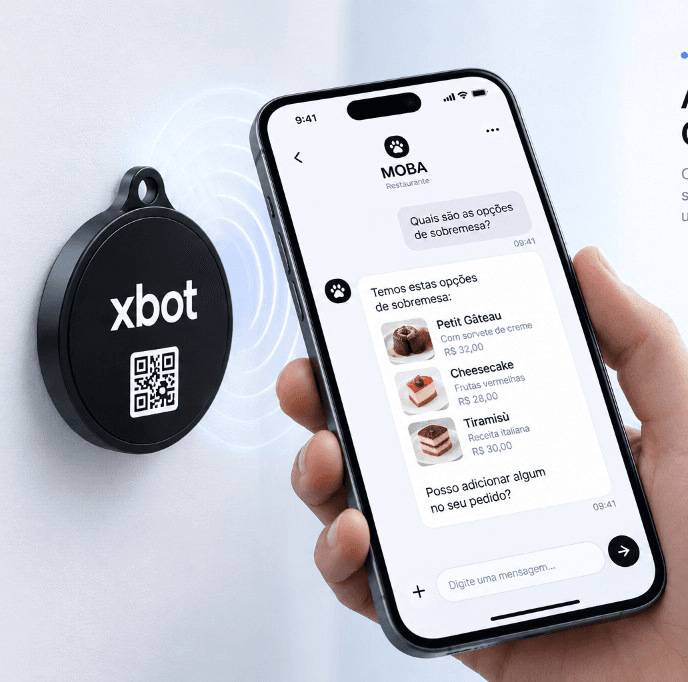
Physical world experience
MOBA connects any physical point to your Agent, bringing the right context for an intelligent, immediate experience.
MOBA recognizes the place and the object.
Ask questions, look up information, or request actions.
The Agent executes, in the right context, in real time.
Any place can be an interface.
What is XBot?
xbot is the layer between your business and the experiences where work happens. Agents use data, capabilities and tools to take actions, run workflows, and reach people on XChat, WhatsApp, MOBA, or your own product.
Where Agents operate

Real-world applications
WhatsApp, sales, CRM, orders, support, WMS, and MOBA — the same Agent, on the surfaces your business already uses.
WhatsApp Business
● Active
Where is my order?
Order #1842 ships today. Want the tracking link?
Sales
Opportunity
Qualification
● Open
I want the plan for my team.
Noted. I opened the opportunity and will share next steps.
Commerce
Product
$129.00
● In stock
12 units
Do you have this product in stock?
Yes. We have 12 units. Should I open the order?
AI Agents as structure
Traditional software requires developers to encode every interaction path.
AI-native applications let users say what they want while an Agent determines how the system should respond.
Your business
xbotAI Agents
Intelligent operating layer
From intention to action
Any interface
Real outcomes
One Agent, any interface
The interface changes. The intelligence remains.
XChat, WhatsApp, MOBA, or your own product — same Agent.
One Agent. Any interface.
The same Agent understands the context, reaches the right data, and executes real actions — on WhatsApp, XChat, MOBA, or your own app.
The user speaks. The Agent understands the business. xbot governs. The operation happens.
How it works
Create the Agent, give it capabilities, then connect any experience.
Define what the Agent represents.
Sales, support, commerce, WMS, or WhatsApp Agent.
Configure what it is allowed to do.
Search products, create orders, check inventory, send messages, run workflows.
Expose the same Agent through the surfaces you already use.
XChat, WhatsApp, MOBA, custom web, mobile, or API.
Operational control plane
Customers, people, processes, sales, and tasks in one place — with Agents helping the operation move forward.
People serve. Agents execute. Processes connect the work. The Cockpit shows the business happening.
Capabilities
Not a chatbot bolted onto a CRM. A structured runtime: data, capabilities, tools, actions, workflows, and integrations.
Business context the Agent can actually use — contacts, orders, knowledge, and tenant data — scoped to the right workspace.
What the Agent is allowed to do in this function: qualify, resolve, schedule, collect, hand off, or operate a process.
Callable skills: APIs, MCP, catalogs, knowledge, and operator tools bound by the creator — not a generic plugin soup.
Side-effects with control: send a message, update a record, open a ticket, trigger a workflow — with approval when it matters.
Flowcharts and playbooks that keep work moving: stages, owners, SLAs, and a path from intake to done.
Reach people and systems where they already are — XChat, WhatsApp, webhooks, REST, and your own application.
Enterprise
xbot separates what the Agent understands, what it is allowed to do, and what the system executes.
The Agent is intelligent. The system remains controlled.
Aprendiz memory is tenant + user. Workforce memory is tenant + Agent. Personal context never becomes shared Agent memory.
Agents execute with XBot AuthZ and the tools the creator attached. They do not get a blank check on your systems.
Actions that change the business can require a person. Autonomy is available; replacing the operator is not the default.
Conversations, actions, and workflow steps leave a trail. Encryption in transit and at rest, aligned with GDPR and LGPD.
Same Agent model from the first trial to a governed production workspace.
Developers
Use xbot as the intelligent backend of your application.
Your frontend talks to the Agent. The Agent uses data, capabilities and tools — with the authorization of the platform.
The Agent itself guides the conversation so you can use the application.
No credit card · Same Agent model from trial to production
xbot is the infrastructure for building AI-native applications. You give your product an intelligent Agent with business data, capabilities, tools, workflows and actions — without assembling that stack from scratch.
Those can be applications you build on xbot. The platform is the Agent runtime underneath: data, capabilities, tools, workflows, and the surfaces where people talk — XChat, WhatsApp, MOBA, or your own app.
An Agent is a structured specialist: identity, instructions, tools, and a conversation surface. Workforce Agents serve a function (sales, support, a process). Aprendiz is a personal copilot per signed-in user.
MOBA is the live full-screen Agent experience. On the homepage, the Ask anything field opens that conversation in the same tab — text only, no attach or voice. The Agent itself guides you into using the application.
Between your business and the channels where work happens. Agents sit on data, capabilities and tools, take actions through workflows and integrations, and reach people on XChat, WhatsApp, or your product.
Yes. XChat embeds in your product. The same Agent can also run on WhatsApp and MOBA. You do not rebuild the runtime for each surface.
A model generates text. xbot runs Agents that already have business data, tools, workflows, authorization, and channels. You configure the function; the platform operates it.
Yes. REST API, webhooks, and MCP so Agents and your systems can call each other. See the public documentation at docs.xbotone.com.
Tenant isolation, AuthZ of the platform, human approval for side-effects, and an audit trail. Aprendiz memory is per user; Workforce memory is per Agent. Data is encrypted in transit and at rest, aligned with GDPR and LGPD.